Vantablack coordinates assistance included in your setup package. Specialist execution is delivered through the selected qualified partner; the relevant authority or bank makes its own approval decision.
Corporate Tax Registration.
Made simple.
A visual walkthrough for registering a UAE company for Corporate Tax through the Federal Tax Authority’s EmaraTax platform.

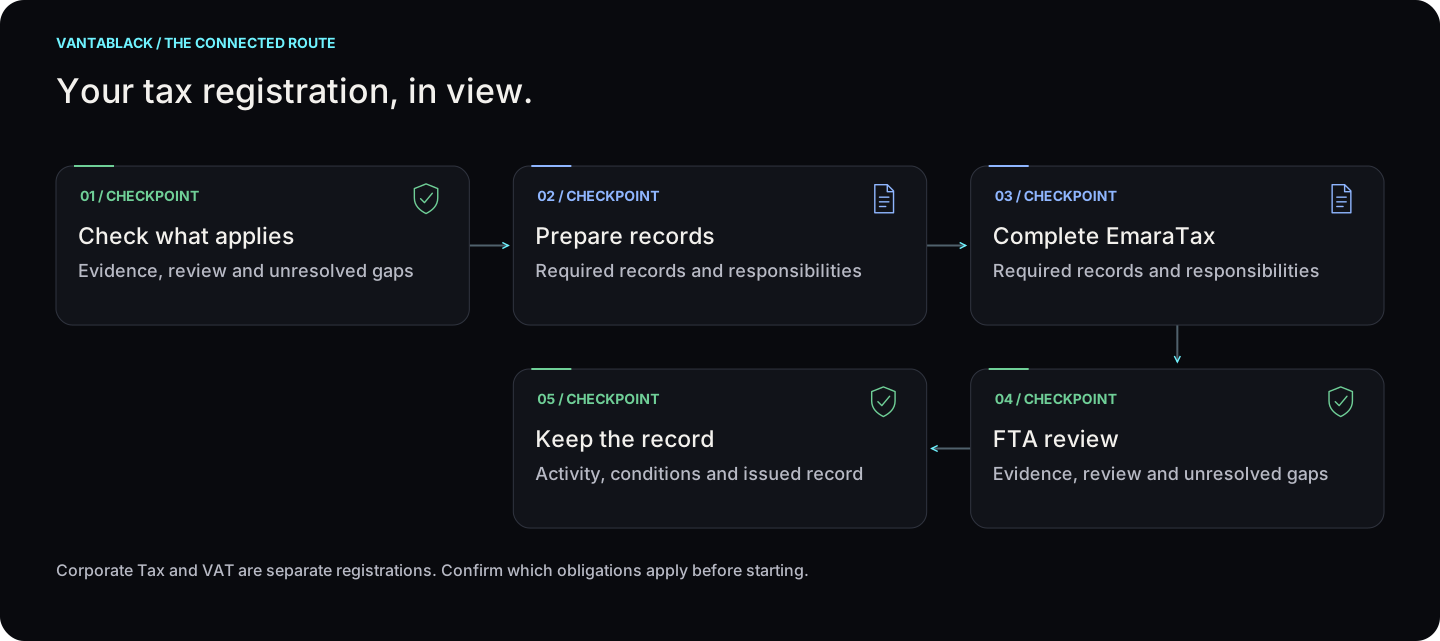
Your tax registration, in view.
Corporate Tax and VAT are separate registrations. Confirm which obligations apply before starting. Select a step to see who acts and what happens next.
Your tax registration, in view.
Select a checkpoint for detail
01Check what appliesView checkpoint
Evidence, review and unresolved gaps
02Prepare recordsView checkpoint
Required records and responsibilities
03Complete EmaraTaxView checkpoint
Required records and responsibilities
04FTA reviewView checkpoint
Evidence, review and unresolved gaps
05Keep the recordView checkpoint
Activity, conditions and issued record
Corporate Tax and VAT are separate registrations. Confirm which obligations apply before starting.
Read the steps
- Check what applies — Evidence, review and unresolved gaps
- Prepare records — Required records and responsibilities
- Complete EmaraTax — Required records and responsibilities
- FTA review — Evidence, review and unresolved gaps
- Keep the record — Activity, conditions and issued record
01
 Check what appliesView step +
Responsible: Client + adviser
Confirm whether you need Corporate Tax, VAT or both.
Next: Prepare records
Time: Confirmed for your file; see the estimate below.
02
 Prepare recordsView step +
Responsible: Client
Check legal details, ownership and signatory evidence.
Next: Complete EmaraTax
Time: Confirmed for your file; see the estimate below.
03
Complete EmaraTaxView step +Responsible: Client / authorised representative
Use the appropriate tax registration and review the entries.
Next: FTA review
Time: Confirmed for your file; see the estimate below.
04
 FTA reviewView step +
Responsible: FTA
Respond to any information request; review time follows a complete file.
Next: Keep the record
Time: Confirmed for your file; see the estimate below.
05
 Keep the recordView step +
Responsible: Client + adviser
Save the registration record and plan the next compliance steps.
Next: Agree the next service only if needed
Time: Confirmed for your file; see the estimate below.
Time estimate
The Corporate Tax guide records about 25 minutes to submit and up to 20 business days for a complete application; these are estimates.
Costs before you proceed
Corporate Tax registration has no FTA fee. Any Vantablack or tax-agent work follows the agreed service scope.
Visits and presence
Registration is through EmaraTax. Follow the current access and authorised-signatory requirements.
Prepare these documents
- Trade licence and company records
- Owner and authorised-signatory identification
- Authority and supporting financial evidence, where applicable
How VAT differs
Check eligibility → gather turnover evidence → complete the VAT registration in EmaraTax → FTA review → keep the registration record.
VAT is separate from Corporate Tax. The FTA requests supporting records for the entity and registration basis; your adviser confirms the applicable checklist.
Use the current FTA service information for your application. No VAT approval or fixed completion date is promised.

UAE companies and other juridical persons that need to register for Corporate Tax. Natural-person registration follows different eligibility rules, so this guide focuses on a company setup.

The core process on this page was cross-checked against the Federal Tax Authority’s current Corporate Tax Registration service: registration has no FTA fee, the FTA lists approximately 25 minutes to submit, and up to 20 business days to process a complete application.

Have these documents ready.

Your registration journey.
Follow the sequence below. The wording inside EmaraTax may change slightly, but the logic stays the same.
Register and activate your EmaraTax account
If you already use EmaraTax for VAT or Excise Tax, use the existing login. Otherwise create a new account and activate it.
Create a New Taxable Person
From the dashboard, create the profile for the company that will be registered. Enter the legal entity details carefully and exactly as shown on the licence.
Click “View” on the Taxable Person
This opens the company’s tax dashboard. Corporate Tax will appear as one of the available tax modules.
Corporate Tax → Actions → Register
Use the three-dot Actions menu beside Corporate Tax and select Register.
Complete the registration form
Work through the form section by section. You will be asked for entity, licence, ownership, branch and authorised-signatory information where applicable.
Attach the supporting documents
Upload the required PDF documents. Make sure names, licence information and ownership data match the information entered in the form.
Review everything before submission
Check legal name, licence number, ownership percentages, branch details and authorised signatory. Save as draft if you need to return later.
Send the application to the FTA
Submit the completed registration. The FTA’s service card lists an estimated processing time of up to 20 business days once a complete application is received.

Application approved → Corporate Tax TRN issued.
Keep the TRN and registration confirmation with your company records. Registration is not the same as filing a Corporate Tax return; filing and payment obligations come later according to your tax period.

Four checks before you press Submit.
Ownership matches
Owners holding more than 25% should be entered correctly and supported by valid identification.
Licence is current
Use the active licence and include branch licences where applicable.
Signatory is authorised
Upload proof showing that the person submitting or signing is authorised to act for the company.
Documents are readable
Use clear PDFs and keep every individual file within the FTA upload limit.

This is a simplified support guide, not tax advice. Registration obligations and deadlines depend on the taxpayer’s circumstances. The Federal Tax Authority remains the authoritative source for current rules and the EmaraTax process.
Send an enquiryWhat else is needed after the licence is issued?
Why this matters
After getting the licence, check banking, accounting, visas, records and any permits needed to operate. Agree who will handle each requirement and keep the supporting documents.
What could change the answer?
New products, services, owners, locations or employees can trigger additional reviews after formation.
Check these details first
- A list of your company’s required filings and renewals
- Responsible owners and supporting records
- Banking and transaction readiness
- Permissions for the work you will do