


Start without an account workflow
Open ICP Smart Services, choose Public Services, then select the Golden Residence nomination request and start the service.
Smart Services → Public Services → Golden Residence → Nomination Request → New Request
A simplified guide to accessing the ICP Smart Services nomination request, entering the applicant information, uploading supporting documents, reviewing the request and submitting it for consideration.
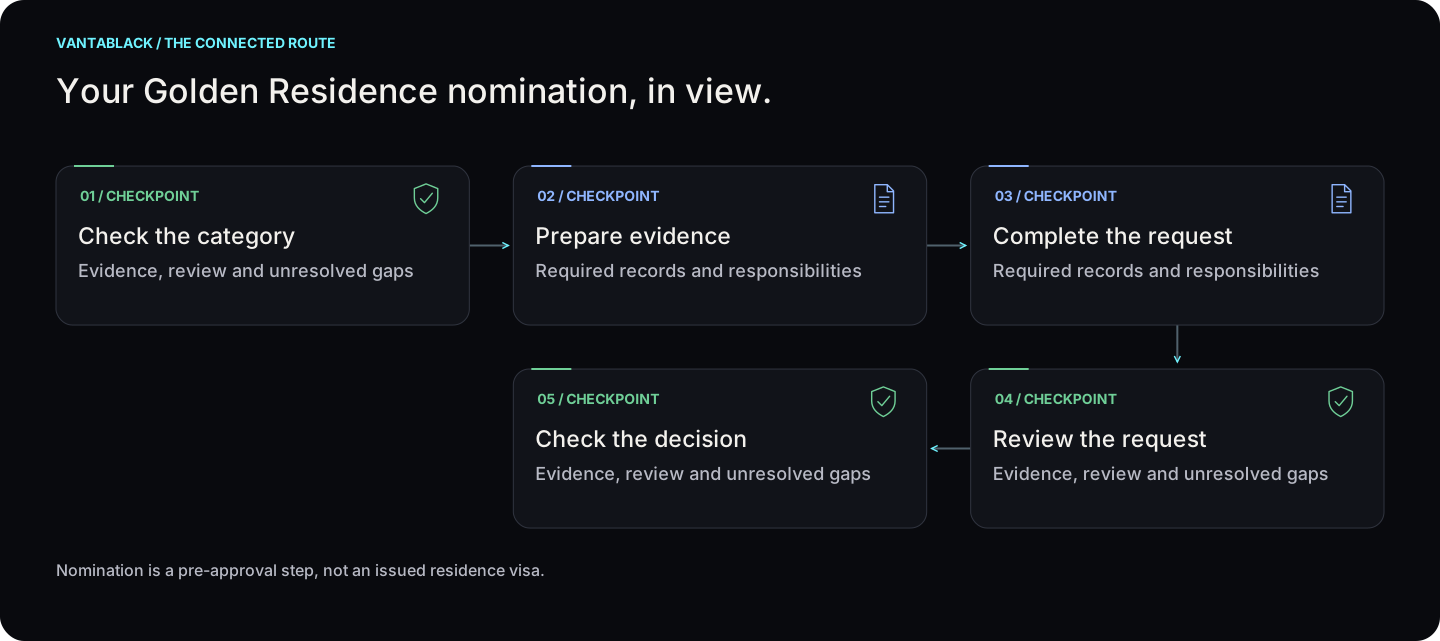
Nomination is a pre-approval step, not an issued residence visa. Select a step to see who acts and what happens next.
Evidence, review and unresolved gaps
Required records and responsibilities
Required records and responsibilities
Evidence, review and unresolved gaps
Evidence, review and unresolved gaps
Nomination is a pre-approval step, not an issued residence visa.
 Check the categoryView step +
Responsible: Client + Vantablack
Check which category and evidence fit the application.
Next: Prepare evidence
Time: Confirmed for your file; see the estimate below.
 Prepare evidenceView step +
Responsible: Client
Gather the documents requested for the selected category.
Next: Complete the request
Time: Confirmed for your file; see the estimate below.
Complete the requestView step +Responsible: Client / authorised representative
Enter details and review the attachments before sending.
Next: Review the request
Time: Confirmed for your file; see the estimate below.
 Review the requestView step +
Responsible: ICP
The authority may ask for additional information.
Next: Check the decision
Time: Confirmed for your file; see the estimate below.
 Check the decisionView step +
Responsible: Client + Vantablack
Read the decision and confirm any separate residence application.
Next: Agree the next service only if needed
Time: Confirmed for your file; see the estimate below.
The selected authority confirms review time. A nomination does not guarantee approval or a final residence permit.
The nomination fees and channel caveat remain below. Later residency costs are separate; confirm them before proceeding.
The nomination channel is digital. Any later medical or identity appointments depend on the approved residence route.
The source manual is an ICP Smart Services user manual for a nomination request for Golden Residence.
It explains how applicants who meet the requirements can submit a nomination request digitally without visiting a happiness centre.
ICP continues to publish Golden Residency services and a nomination-request pathway.
The older user manual remains useful for the workflow, but portal screens and category-specific evidence may change.
The application journey is similar, but the way you access it depends on whether you are applying through the public portal, an individual account, or an establishment account.
Open ICP Smart Services, choose Public Services, then select the Golden Residence nomination request and start the service.
Log in, browse Smart Services, select Visa, then Golden Residence, Nomination Request for Golden Residence, and New Request.
Log in to the establishment portal, browse Smart Services and open the Golden Residence nomination request from the Visa module.
Three ways in, four stages to submit, then the authority decides. ICP’s current service card lists AED 0 application and issuance fees and an AED 100 smart services fee. Check the fee shown for your channel before you submit.
This shows the digital nomination workflow only. It does not decide eligibility; ICP makes that decision, and screens or evidence can change.
Enter the service-beneficiary information, select the Golden Visa category and sub-category, and provide contact details.
Upload the supporting documents required for the nomination request.
Check the information carefully before moving to submission.
Agree to the terms and conditions, pay any fee shown, then submit. The older ICP manual described the nomination as having no fee; the current service card lists AED 0 application and issuance fees and an AED 100 smart services fee (checked 22 October 2026).
Enter the service-beneficiary details required by the nomination request form.
Select the nominated Golden Visa category and the applicable sub-category.
Provide contact details so ICP can communicate with the applicant about the request.
Upload the requested attachments that support the nomination request.
Once submission is complete, the system displays a confirmation message and provides a request number.
The request is reviewed by the authority against the applicable Golden Residence requirements.
The manual states that after approval a notification is sent to the applicant, who can then begin the entry-permit process through the appropriate service for the category.
Vantablack can help structure the applicant information, check that the selected nomination category matches the client's profile, organise the supporting-document pack, and guide the client through the digital submission journey. Final eligibility and approval remain with the relevant authority.
This guide explains the digital nomination-request process shown in the supplied ICP manual.
It does not by itself determine whether a person qualifies for Golden Residence.
Eligibility criteria, required evidence and portal screens can change and should be verified before submission.
Checked on 22 October 2026. Rules and fees change; we recheck them before advising on your case.
A property, nomination or ownership position does not automatically establish residence eligibility. Identify the relevant category and confirm the evidence needed for that application.
Different ownership evidence, an applicant category or the responsible authority can change the route. Company incorporation is not a substitute for a residence approval.